

Get started with the process of deploying a validator node by reading the doc on node deployment prerequisites.
Owner and signer wallets
The signer wallet is an address that is used for signing Heimdall blocks, checkpoints, and other signing-related activities. This wallet’s private key is on the validator node for signing purposes. It cannot manage staking, rewards, or delegations. The validator must keep two types of balances in this wallet:- POL tokens on Heimdall (through top-up transactions) to perform validator responsibilities on Heimdall.
- ETH on Ethereum to send checkpoints on Ethereum.
Wallet setup and maintenance
- Key storage and maintenance are critically important. Use a secrets manager, or password manager for key management when setting up a wallet for your validator. If you choose to use another method, please ensure you have a solid understanding of the associated processes.
- Refer to OWASP’s key management cheat sheet.
- Hardware wallets can provide an additional layer of security, but do not rely on them to be completely fault proof, or to protect you in case your key is compromised.
- Rotate keys at least once a year. Also, it is important to rotate your keys if, at any point, you believe them to be compromised.
- Please do your own research for your specific needs.
Operating system
The operating system of your choice is also a key factor in securing your validator node and preventing exploitation.- Please keep your system up to date using common practices like using your operating system package manager, such as
yum,apt,brew,pacman, etc. There are many package managers, and each one has its own best practices guide and suggestions that you can refer to. - NEVER run unnecessary software on your node. Limit the number of services and applications running on your node.
- Run single-purpose nodes. For example, you should not run a validator as an RPC endpoint for the public to consume. This is a known issue which you can avoid by not using the node for multiple purposes.
- Validator nodes should only be running the required Bor, Heimdall, and RabbitMQ services. Anything else running on the host, outside of a monitoring tool or firewall, could open you up to exploits.
- Limit access to your validator node to as few people as possible. This includes limiting SSH access only to selected people, or having no access to the host at all. The fewer people with access to the nodes, the fewer potential key disclosures, accidental events, and attack surfaces.
- Accessing your machine can be accomplished in a couple of ways. On AWS, you could use an SSM or GCP cloud shell. You can also use Docker containers if you wish to rely on SSH. Please understand the risks of key and credential disclosure and any accounts that have access to the host(s).
- Use IP-restricted SSH access on a different port.
- Use SSH keys and not passwords.
- Disable password login.
- Disable all root access; use individual accounts with sudo.
- Add brute-force SSH protection: Fail2Ban.
- Add 2FA for SSH access.
Networking
-
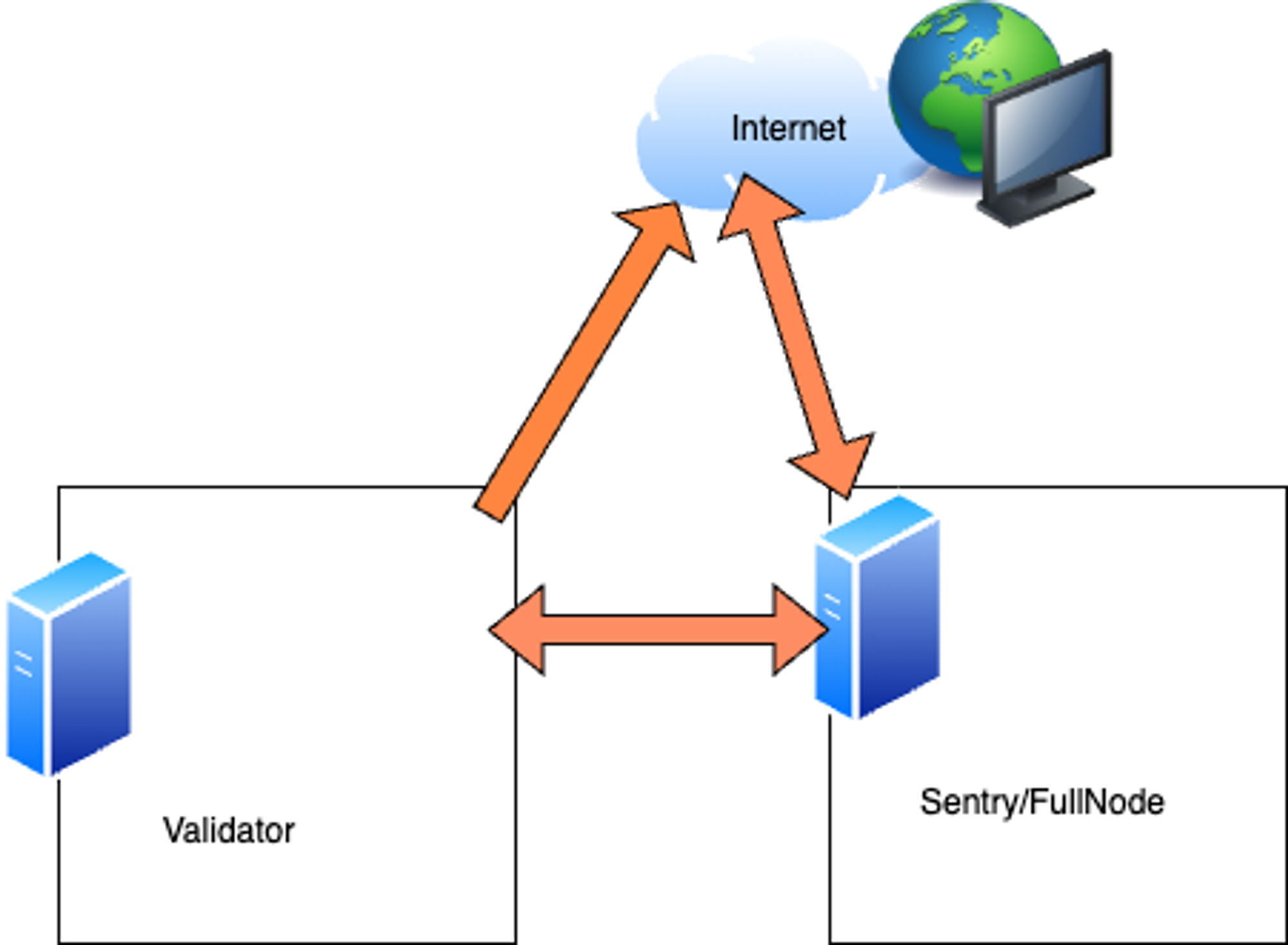
- Do not expose any ports publicly for your validator node. Instead, use a sentry/full node with port
30303(TCP and UDP) for Bor and port26656(TCP) for Heimdall available publicly.
- Do not expose any ports publicly for your validator node. Instead, use a sentry/full node with port
- Configure your validator to operate as a static node in the Bor
config.tomlfile and as a seed node/persistent peer in the Heimdall config. This allows your validator node to be isolated from the public internet and uses your sentry/full node instead of relying on unknown peers, which allows for greater security.
Validator backup
There is also now a validator backup playbook available from thenode-ansible repo. This tool allows you to backup your current configuration for your validator. This can be quite useful for migrating to a new host. To use this tool, run the following command:
Host migration
If you are migrating a host, you may want to create an existing snapshot of your chain data for Bor and Heimdall. You can do this by running the following commands:Monitoring and observability
If you already ship your logs to Coralogix, Datadog, or Splunk, then your monitoring uses this information. You could also be using Nagios or another similar tool to actively monitor your validator nodes. Here are some scenarios and data to consider logging when monitoring a node:- Is the Bor service up?
- Is the Heimdall service up?
- Is the chain out of sync?
- Traffic inbound (RPC calls to your sentry).
- Disk space usage.
- Memory usage.
- Network usage.