Asset Bridging

Learn how to bridge tokens and native assets between different chains using the Unified Bridge

Overview

Asset bridging enables the transfer of tokens and native assets between Agglayer connected chains. The Unified Bridge supports various token types and provides a secure, trustless mechanism for cross-chain asset transfers.

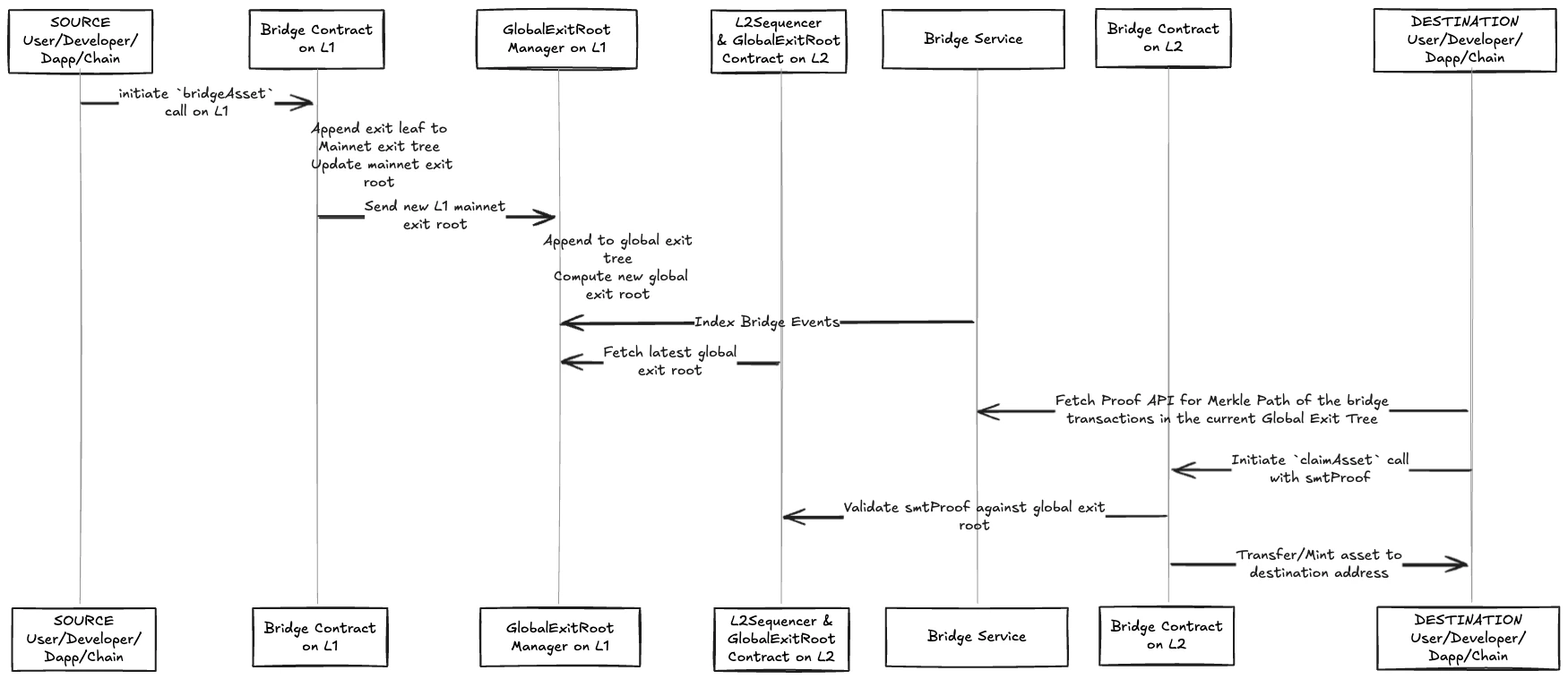
Asset Bridging Process

Figure 1: Complete asset bridging flow from L1 to L2

Supported Token Types

The Unified Bridge handles different token types with specific mechanisms:

Token TypeSource Chain ActionDestination Chain Action
Native Gas Token (ETH, Custom Gas Token)Bridge contract holds tokensBridge contract transfers tokens
WETHBurn WETH tokens from userMint WETH tokens to user
Foreign ERC20 (Not native to source)Burn ERC20 tokens from userMint wrapped tokens to user
Native ERC20 (Native to source)Transfer ERC20 to bridge contractTransfer from bridge contract to user

Bridge Asset Function

The bridgeAsset function initiates asset transfers between chains.

Function Signature

function bridgeAsset(
    uint32 destinationNetwork,
    address destinationAddress,
    uint256 amount,
    address token,
    bool forceUpdateGlobalExitRoot,
    bytes calldata permitData
) external payable

Parameters

  • destinationNetwork: Network ID of the destination chain
  • destinationAddress: Address to receive assets on destination chain
  • amount: Amount of tokens to bridge
  • token: Token contract address (0x0 for native gas token)
  • forceUpdateGlobalExitRoot: Whether to update GER immediately
  • permitData: Raw permit data for ERC20 tokens (optional)

Process Steps

  1. Validation: Check destination network is not the source network
  2. Token Preparation: Handle token based on type (lock, burn, or transfer)
  3. Event Emission: Emit BridgeEvent with transaction details
  4. Tree Update: Add transaction to Local Exit Tree as leaf node

Token Preparation Logic

The bridge handles different token types with specific mechanisms based on their origin and nature:

Note that in case ETH is the native token, WETHToken will be at 0x0 address.

Native Gas Token (ETH, Custom Gas Token)

// Bridge contract holds the tokens
// The native gas token is already transferred via msg.value
// No additional token transfer required

WETH Token

// Burn WETH tokens from user's address
IWETH(token).burnFrom(msg.sender, amount);

Foreign ERC20 Token (Not native to source chain)

// If the token contract is not originally from the source network, 
// burn the ERC20 token from user's address
IERC20(token).burnFrom(msg.sender, amount);

Native ERC20 Token (Native to source chain)

// If the token contract is originally from the source network:
// 1. Execute permit if provided
if (permitData.length > 0) {
    IERC20Permit(token).permit(...);
}
// 2. Transfer tokens from user to bridge contract
IERC20(token).transferFrom(msg.sender, address(this), amount);

Claim Asset Function

The claimAsset function claims bridged assets on the destination chain.

Function Signature

function claimAsset(
    bytes32[_DEPOSIT_CONTRACT_TREE_DEPTH] calldata smtProofLocalExitRoot,
    bytes32[_DEPOSIT_CONTRACT_TREE_DEPTH] calldata smtProofRollupExitRoot,
    uint256 globalIndex,
    bytes32 mainnetExitRoot,
    bytes32 rollupExitRoot,
    uint32 originNetwork,
    address originTokenAddress,
    uint32 destinationNetwork,
    address destinationAddress,
    uint256 amount,
    bytes calldata metadata
) external

Parameters

  • smtProofLocalExitRoot: Merkle proof for Local Exit Root
  • smtProofRollupExitRoot: Merkle proof for Rollup Exit Root
  • globalIndex: Global index identifying the transaction
  • mainnetExitRoot: Mainnet Exit Root at time of transaction
  • rollupExitRoot: Rollup Exit Root at time of transaction
  • originNetwork: Network ID of source chain
  • originTokenAddress: Token address on source chain
  • destinationNetwork: Network ID of destination chain
  • destinationAddress: Address to receive assets
  • amount: Amount of tokens to claim
  • metadata: Additional metadata (if any)

Process Steps

  1. Validation: Verify destination network matches current chain
  2. Proof Verification: Verify Merkle proofs against Global Exit Root
  3. Duplicate Check: Ensure transaction hasn't been claimed before
  4. Token Transfer: Transfer tokens based on token type (see Token Transfer Logic below)
  5. Claim Record: Mark transaction as claimed

Token Transfer Logic

Once the proof verification passes, the bridge claims tokens using different mechanisms based on the token type:

Token typeAction
ETH is gas tokenBridge contract transfers the amount from itself to the destination address
WETH where ETH is not gas tokenMint new WETH tokens to the destination address
Custom gas tokenBridge contract transfers the amount from itself to the destination address
Native ERC20 TokenIf the token contract is originally from this destination network, transfer the ERC20 token from bridge contract to destination address
Foreign ERC20 Token, First time bridgingDeploy a new ERC20 Token contract to host this new Foreign ERC20 Token, and mint the transfer amount to destination address
Foreign ERC20 Token, Contract existsMint the transfer amount to destination address

Proof Verification Logic

// Construct Global Exit Root
bytes32 globalExitRoot = keccak256(abi.encodePacked(mainnetExitRoot, rollupExitRoot));

// Verify against synchronized GER
require(globalExitRoot == getGlobalExitRoot(), "Invalid global exit root");

// Verify Merkle proofs based on origin
if (originNetwork == 0) {
    // L1 to L2: Verify against mainnet exit root
    verifyMerkleProof(smtProofLocalExitRoot, mainnetExitRoot, globalIndex);
} else {
    // L2 to L2: Verify against rollup exit root
    verifyMerkleProof(smtProofLocalExitRoot, rollupExitRoot, globalIndex);
    verifyMerkleProof(smtProofRollupExitRoot, rollupExitRoot, globalIndex);
}

Bridging Flows

L1 to L2 Bridging

L2 to L1 Bridging

L2 to L2 Bridging

Edit on GitHub

Last updated on