> ## Documentation Index
> Fetch the complete documentation index at: https://docs.polygon.technology/llms.txt
> Use this file to discover all available pages before exploring further.
# Hosted Wallet
> Launch a non-custodial wallet on your domain with OMS-operated infrastructure, branding control, Smart Sessions, and social or email authentication.
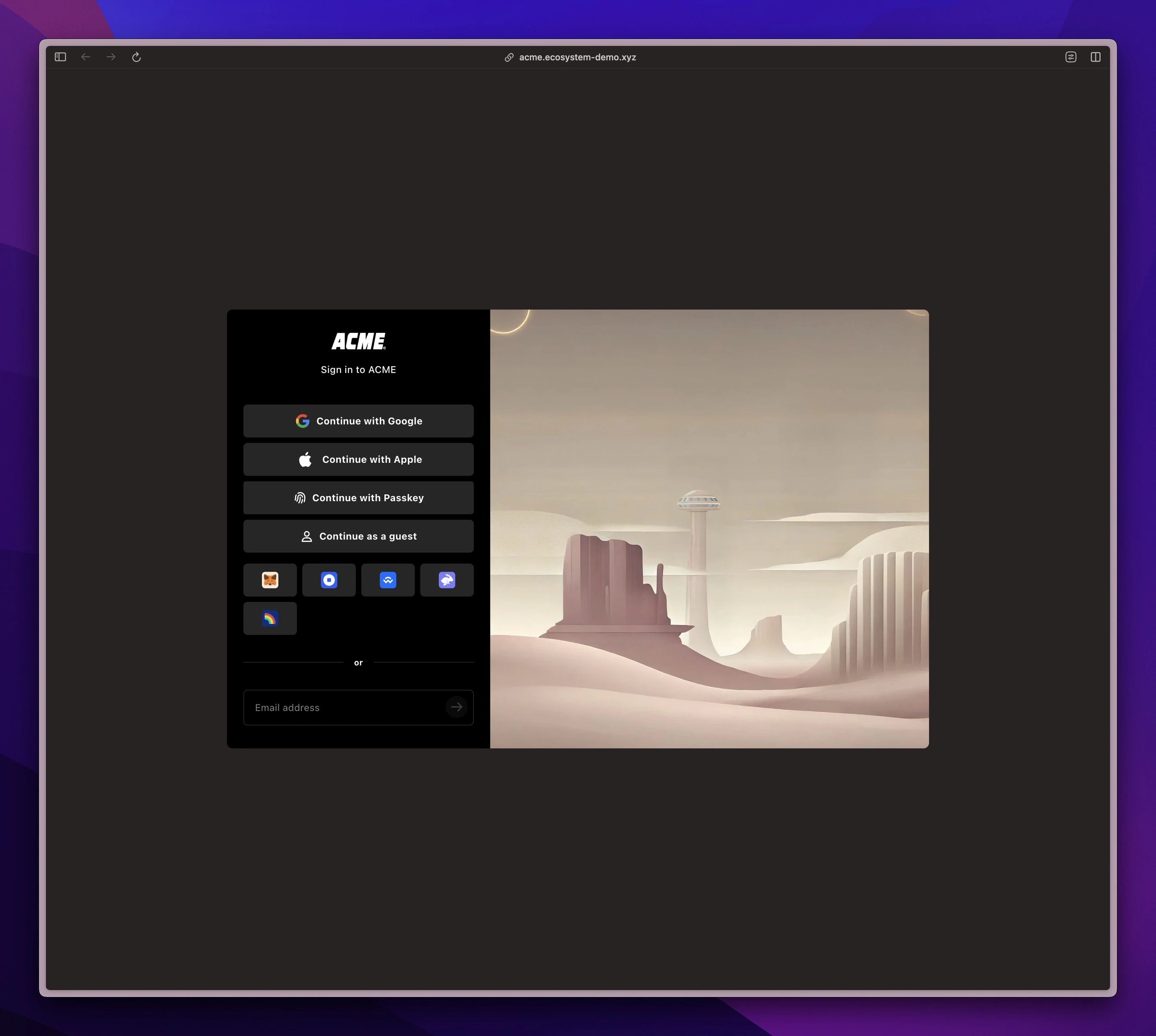 The **Hosted Wallet** is the fastest way to deploy a non-custodial wallet on your domain. OMS operates the wallet infrastructure while you control branding, configuration, and policies in Builder. Your developers integrate against a stable, attested wallet surface across all your apps.
## What you get
* **Your domain and brand**: run at `wallet.yourdomain.com` with your theme, logo, and copy.
* **Smart Sessions**: scoped, sandboxed permissions per app to reduce signing prompts and protect users.
* **Social logins and email**: Google, Apple, email OTP, and any custom OIDC provider; multiple authentication methods link to the same wallet.
* **Attested identity**: sessions are signed inside a hardware-isolated enclave. Apps never handle social auth keys.
* **Cross-chain by default**: multi-chain accounts, balances, and transactions.
* **Admin in Builder**: configure chains, branding, session policies, and integrations from an ecosystem admin panel.
* **Production ops**: OMS runs the wallet stack, enclave services, monitoring, and updates.
Smart Sessions are central to wallet safety and UX. See [Smart Sessions](/wallets/smart-sessions) for the full breakdown.
## How it works
In Builder, set your wallet domain, branding, supported chains, and initial policies.
Connect your identity providers (Google, Apple, email OTP, or a custom OIDC provider). Session attestations are issued by the WaaS enclave.
Create Smart Session scopes for your apps (methods, limits, timeouts) and register app origins.
OMS provisions and operates the wallet on your domain. Your developers connect apps using the standard integration flow.
## Security and reliability
* **Non-custodial**: users control their keys. Timed recovery keys can be enabled for worst-case scenarios.
* **Hardware isolation**: critical signing and identity attestations use TEEs (AWS Nitro Enclaves).
* **Key Machine**: only the latest wallet configuration is accepted onchain, supporting safe key rotation.
* **Audited architecture**: see [Sequence technical references](https://docs.sequence.xyz/solutions/technical-references/overview) for contracts, audits, and deployments.
## Who it is for
Financial products that want a branded wallet, fast time to market, and managed operations without building wallet infrastructure from scratch.
## Further reading
The live Polygon hosted wallet, powered by this deployment pattern.
How session permissions work and how to configure them.
Full breakdown of the identity, session, and configuration systems.
The **Hosted Wallet** is the fastest way to deploy a non-custodial wallet on your domain. OMS operates the wallet infrastructure while you control branding, configuration, and policies in Builder. Your developers integrate against a stable, attested wallet surface across all your apps.
## What you get
* **Your domain and brand**: run at `wallet.yourdomain.com` with your theme, logo, and copy.
* **Smart Sessions**: scoped, sandboxed permissions per app to reduce signing prompts and protect users.
* **Social logins and email**: Google, Apple, email OTP, and any custom OIDC provider; multiple authentication methods link to the same wallet.
* **Attested identity**: sessions are signed inside a hardware-isolated enclave. Apps never handle social auth keys.
* **Cross-chain by default**: multi-chain accounts, balances, and transactions.
* **Admin in Builder**: configure chains, branding, session policies, and integrations from an ecosystem admin panel.
* **Production ops**: OMS runs the wallet stack, enclave services, monitoring, and updates.
Smart Sessions are central to wallet safety and UX. See [Smart Sessions](/wallets/smart-sessions) for the full breakdown.
## How it works
In Builder, set your wallet domain, branding, supported chains, and initial policies.
Connect your identity providers (Google, Apple, email OTP, or a custom OIDC provider). Session attestations are issued by the WaaS enclave.
Create Smart Session scopes for your apps (methods, limits, timeouts) and register app origins.
OMS provisions and operates the wallet on your domain. Your developers connect apps using the standard integration flow.
## Security and reliability
* **Non-custodial**: users control their keys. Timed recovery keys can be enabled for worst-case scenarios.
* **Hardware isolation**: critical signing and identity attestations use TEEs (AWS Nitro Enclaves).
* **Key Machine**: only the latest wallet configuration is accepted onchain, supporting safe key rotation.
* **Audited architecture**: see [Sequence technical references](https://docs.sequence.xyz/solutions/technical-references/overview) for contracts, audits, and deployments.
## Who it is for
Financial products that want a branded wallet, fast time to market, and managed operations without building wallet infrastructure from scratch.
## Further reading
The live Polygon hosted wallet, powered by this deployment pattern.
How session permissions work and how to configure them.
Full breakdown of the identity, session, and configuration systems.