> ## Documentation Index
> Fetch the complete documentation index at: https://docs.polygon.technology/llms.txt
> Use this file to discover all available pages before exploring further.
# Remix
> Deploy a HelloWorld smart contract to Polygon Amoy using Remix IDE and MetaMask.
By the end of this tutorial, you will have written, compiled, deployed, and verified a HelloWorld smart contract on the Polygon Amoy testnet using Remix IDE.
Use [Remix IDE](https://remix.ethereum.org/) for this tutorial. Remix is a browser-based platform that requires no downloads, accounts, or logins to get started.
## What you will do
* Create a file on Remix and add a smart contract.
* Compile the smart contract.
* Connect to the Polygon Amoy testnet via MetaMask.
* Deploy the smart contract.
* Verify the smart contract on Polygonscan.
## Prerequisites
* A [MetaMask account](https://support.metamask.io/getting-started/getting-started-with-metamask/) configured with the Polygon Amoy testnet.
* Test POL tokens from the [Polygon faucet](https://faucet.polygon.technology/) to pay gas fees.
## Step 1: Create the contract file
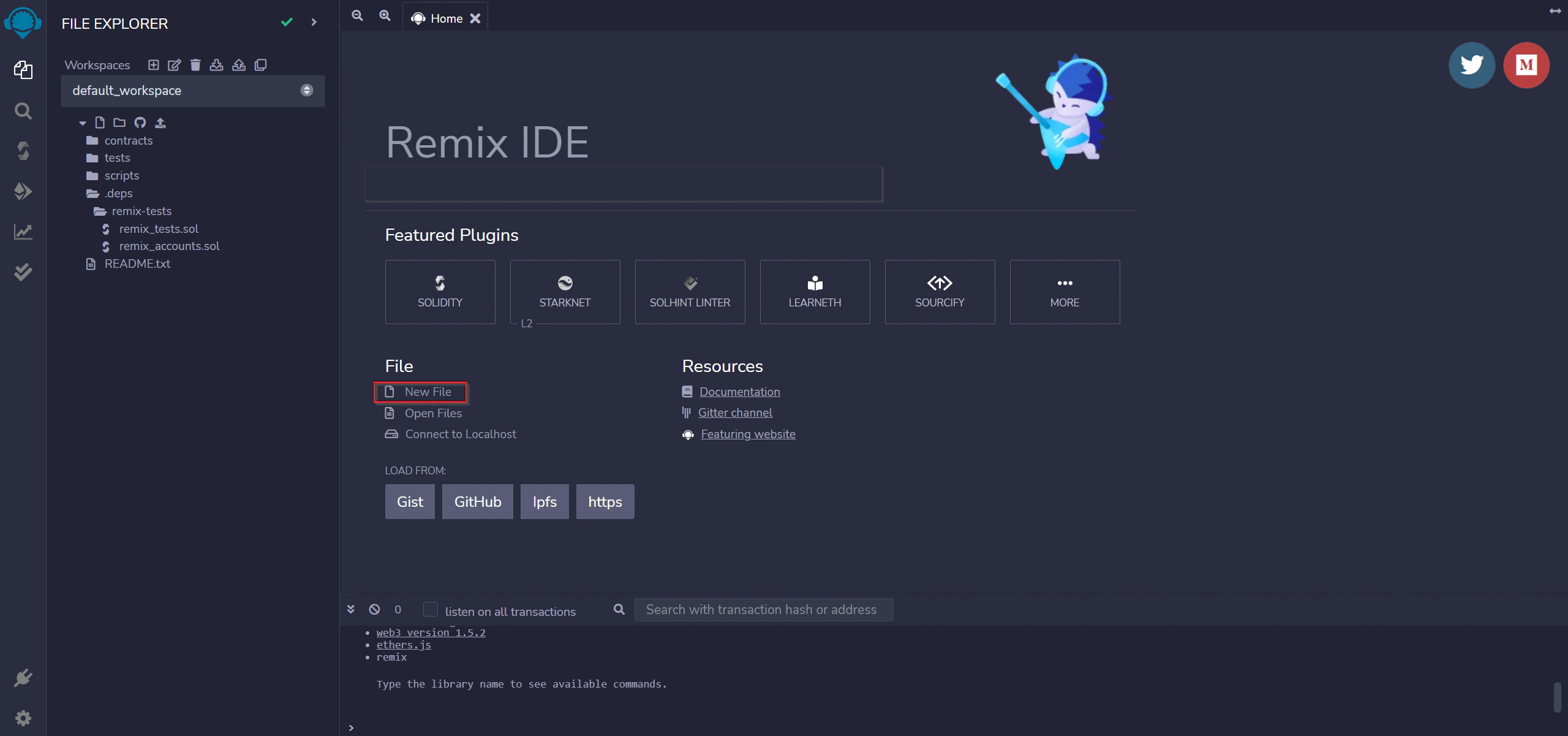
Go to [Remix IDE](https://remix.ethereum.org/). Click **New File** and name it `HelloWorld.sol`.
 ## Step 2: Add the smart contract
Copy and paste the following into `HelloWorld.sol`:
```js title="HelloWorld.sol" theme={null}
// Specifies that the source code is for a version
// of Solidity greater than 0.5.10
pragma solidity ^0.5.10;
// A contract is a collection of functions and data (its state)
// that resides at a specific address on the Ethereum blockchain.
contract HelloWorld {
// The keyword "public" makes variables accessible from outside a contract
// and creates a function that other contracts or SDKs can call to access the value
string public message;
// A special function only run during the creation of the contract
constructor(string memory initMessage) public {
// Takes a string value and stores the value in the memory data storage area,
// setting `message` to that value
message = initMessage;
}
// A publicly accessible function that takes a string as a parameter
// and updates `message`
function update(string memory newMessage) public {
message = newMessage;
}
}
```
The contract stores a `message` string in public state. The constructor sets the initial message on deployment. The `update` function lets anyone with owner access change the message afterward.
## Step 3: Compile the contract
1. Go to the **Solidity Compiler** tab (below the search button).
2. Set the compiler version to **0.5.10**.
3. Compile `HelloWorld.sol`.
A green tick mark on the **Compiler** tab confirms successful compilation.
## Step 4: Connect MetaMask to Polygon Amoy
1. Open MetaMask and click the network dropdown (set to **Ethereum Mainnet** by default).
2. Click **Add Network** and enter the Amoy testnet details:
* **Network:** Polygon Amoy testnet
* **RPC URL (public):** `https://rpc-amoy.polygon.technology/`
* **RPC URL (dedicated):** `https://polygon-amoy.g.alchemy.com/v2/{your-api-key}` (requires a [free Alchemy API key](https://docs.alchemy.com))
* **Chain ID:** 80002
* **Currency Symbol:** POL
* **Block Explorer URL:** `https://amoy.polygonscan.com/`
3. Click **Save**.
4. Copy your wallet address from MetaMask.
5. Go to the [Polygon faucet](https://faucet.polygon.technology/) and request test POL. Select **Amoy** as the network and **POL Token** as the token. You can also use the [Alchemy Amoy faucet](https://www.alchemy.com/faucets/polygon-amoy).
## Step 5: Deploy to Amoy
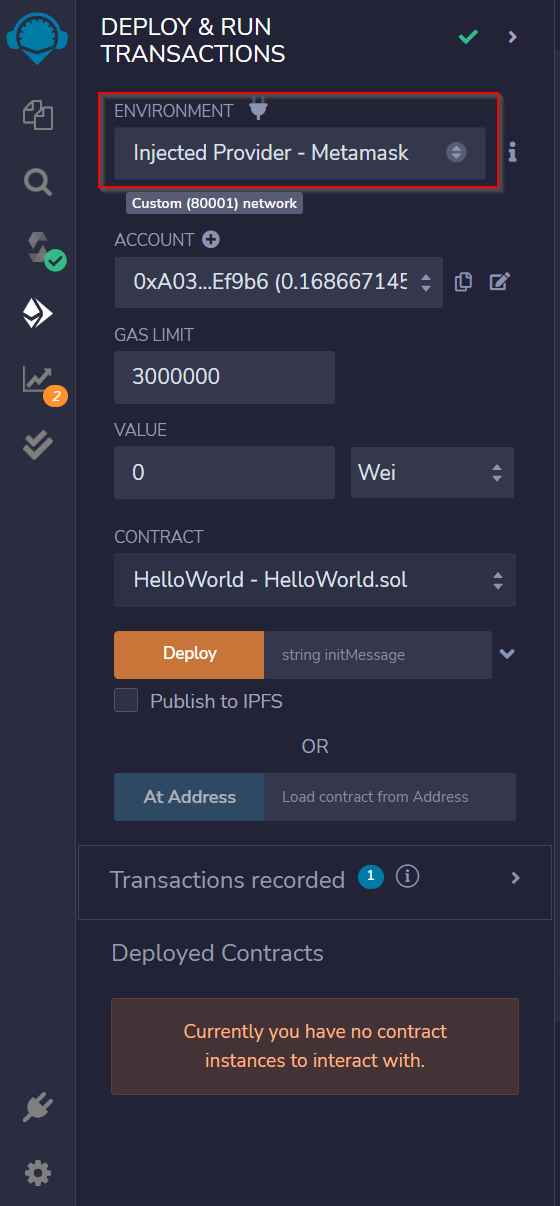
In Remix, use the **Deploy & Run Transactions** tab:
1. Select **Injected Provider - MetaMask** in the **Environment** dropdown.
2. Select your contract from the contract list.
## Step 2: Add the smart contract
Copy and paste the following into `HelloWorld.sol`:
```js title="HelloWorld.sol" theme={null}
// Specifies that the source code is for a version
// of Solidity greater than 0.5.10
pragma solidity ^0.5.10;
// A contract is a collection of functions and data (its state)
// that resides at a specific address on the Ethereum blockchain.
contract HelloWorld {
// The keyword "public" makes variables accessible from outside a contract
// and creates a function that other contracts or SDKs can call to access the value
string public message;
// A special function only run during the creation of the contract
constructor(string memory initMessage) public {
// Takes a string value and stores the value in the memory data storage area,
// setting `message` to that value
message = initMessage;
}
// A publicly accessible function that takes a string as a parameter
// and updates `message`
function update(string memory newMessage) public {
message = newMessage;
}
}
```
The contract stores a `message` string in public state. The constructor sets the initial message on deployment. The `update` function lets anyone with owner access change the message afterward.
## Step 3: Compile the contract
1. Go to the **Solidity Compiler** tab (below the search button).
2. Set the compiler version to **0.5.10**.
3. Compile `HelloWorld.sol`.
A green tick mark on the **Compiler** tab confirms successful compilation.
## Step 4: Connect MetaMask to Polygon Amoy
1. Open MetaMask and click the network dropdown (set to **Ethereum Mainnet** by default).
2. Click **Add Network** and enter the Amoy testnet details:
* **Network:** Polygon Amoy testnet
* **RPC URL (public):** `https://rpc-amoy.polygon.technology/`
* **RPC URL (dedicated):** `https://polygon-amoy.g.alchemy.com/v2/{your-api-key}` (requires a [free Alchemy API key](https://docs.alchemy.com))
* **Chain ID:** 80002
* **Currency Symbol:** POL
* **Block Explorer URL:** `https://amoy.polygonscan.com/`
3. Click **Save**.
4. Copy your wallet address from MetaMask.
5. Go to the [Polygon faucet](https://faucet.polygon.technology/) and request test POL. Select **Amoy** as the network and **POL Token** as the token. You can also use the [Alchemy Amoy faucet](https://www.alchemy.com/faucets/polygon-amoy).
## Step 5: Deploy to Amoy
In Remix, use the **Deploy & Run Transactions** tab:
1. Select **Injected Provider - MetaMask** in the **Environment** dropdown.
2. Select your contract from the contract list.
 3. Accept the **Connect** request in MetaMask when it appears.
4. Click **Deploy**. A MetaMask popup will ask you to confirm the transaction. Confirm it.
3. Accept the **Connect** request in MetaMask when it appears.
4. Click **Deploy**. A MetaMask popup will ask you to confirm the transaction. Confirm it.
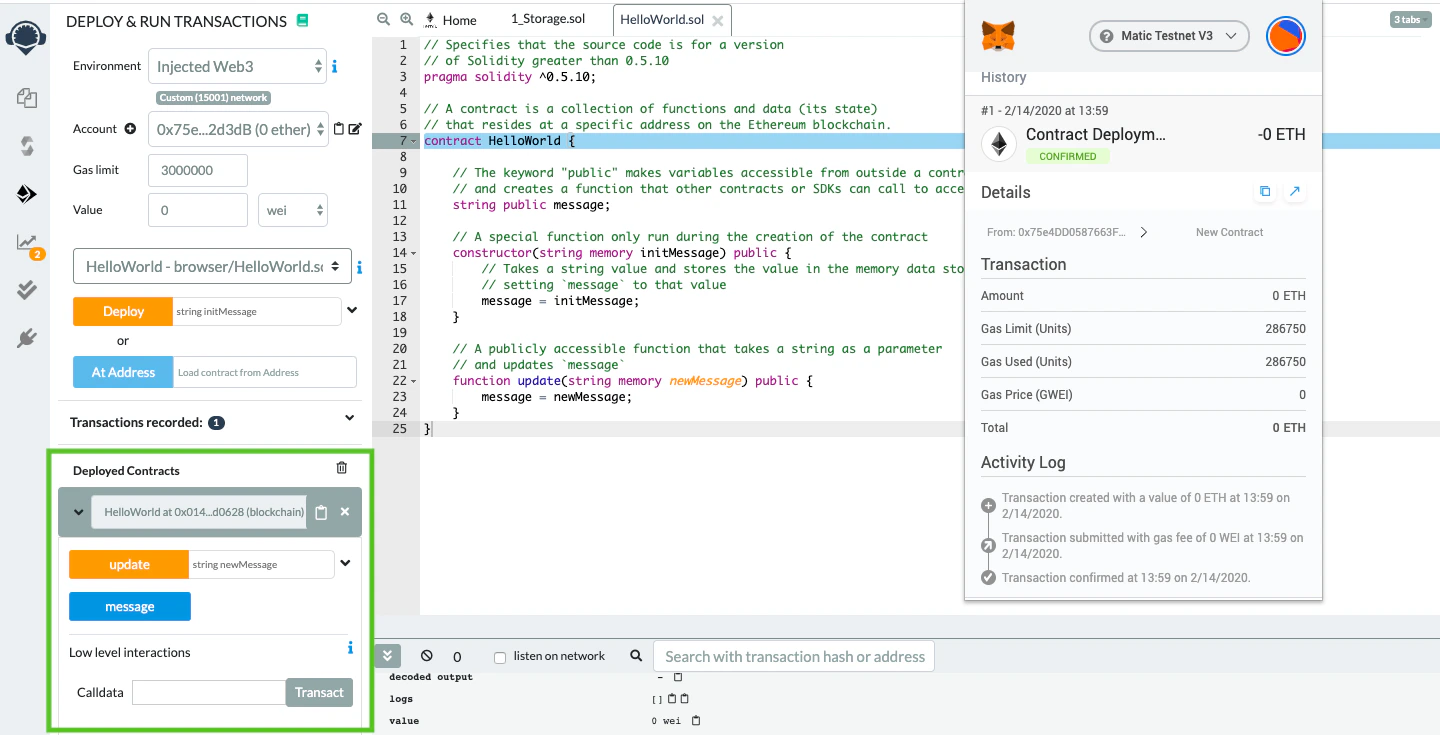 Your `HelloWorld` contract is now deployed to the Polygon Amoy testnet. Check the deployment at `https://amoy.polygonscan.com/`.
## Deploy to Polygon mainnet
After testing on Amoy, deploy to mainnet the same way. Note that mainnet deployment costs real POL for gas.
1. Open MetaMask and click **Add Network**.
2. Have your [Alchemy API key](https://docs.alchemy.com/docs/alchemy-quickstart-guide) ready.
3. Add the mainnet details:
* **Network Name:** Polygon Mainnet
* **New RPC URL:** `https://polygon-mainnet.g.alchemy.com/v2/{your-api-key}`
* **Chain ID:** 137
* **Currency Symbol:** POL
* **Block Explorer URL:** `https://polygonscan.com/`
4. Click **Save** and make sure your wallet holds POL to cover gas fees.
5. Follow the same Remix deployment steps above, now with Polygon Mainnet selected in MetaMask.
## Verify your contract on Polygonscan
### Flatten the contract
Install a flattener to combine all Solidity source files into one:
```bash theme={null}
sol-merger \"./contracts/*.sol\" ./build
```
You can use [truffle-flattener](https://github.com/nomiclabs/truffle-flattener) or [sol-merger](https://github.com/RyuuGan/sol-merger).
### Submit for verification
1. Navigate to your contract's Polygonscan page and click **Verify and Publish**.
Your `HelloWorld` contract is now deployed to the Polygon Amoy testnet. Check the deployment at `https://amoy.polygonscan.com/`.
## Deploy to Polygon mainnet
After testing on Amoy, deploy to mainnet the same way. Note that mainnet deployment costs real POL for gas.
1. Open MetaMask and click **Add Network**.
2. Have your [Alchemy API key](https://docs.alchemy.com/docs/alchemy-quickstart-guide) ready.
3. Add the mainnet details:
* **Network Name:** Polygon Mainnet
* **New RPC URL:** `https://polygon-mainnet.g.alchemy.com/v2/{your-api-key}`
* **Chain ID:** 137
* **Currency Symbol:** POL
* **Block Explorer URL:** `https://polygonscan.com/`
4. Click **Save** and make sure your wallet holds POL to cover gas fees.
5. Follow the same Remix deployment steps above, now with Polygon Mainnet selected in MetaMask.
## Verify your contract on Polygonscan
### Flatten the contract
Install a flattener to combine all Solidity source files into one:
```bash theme={null}
sol-merger \"./contracts/*.sol\" ./build
```
You can use [truffle-flattener](https://github.com/nomiclabs/truffle-flattener) or [sol-merger](https://github.com/RyuuGan/sol-merger).
### Submit for verification
1. Navigate to your contract's Polygonscan page and click **Verify and Publish**.
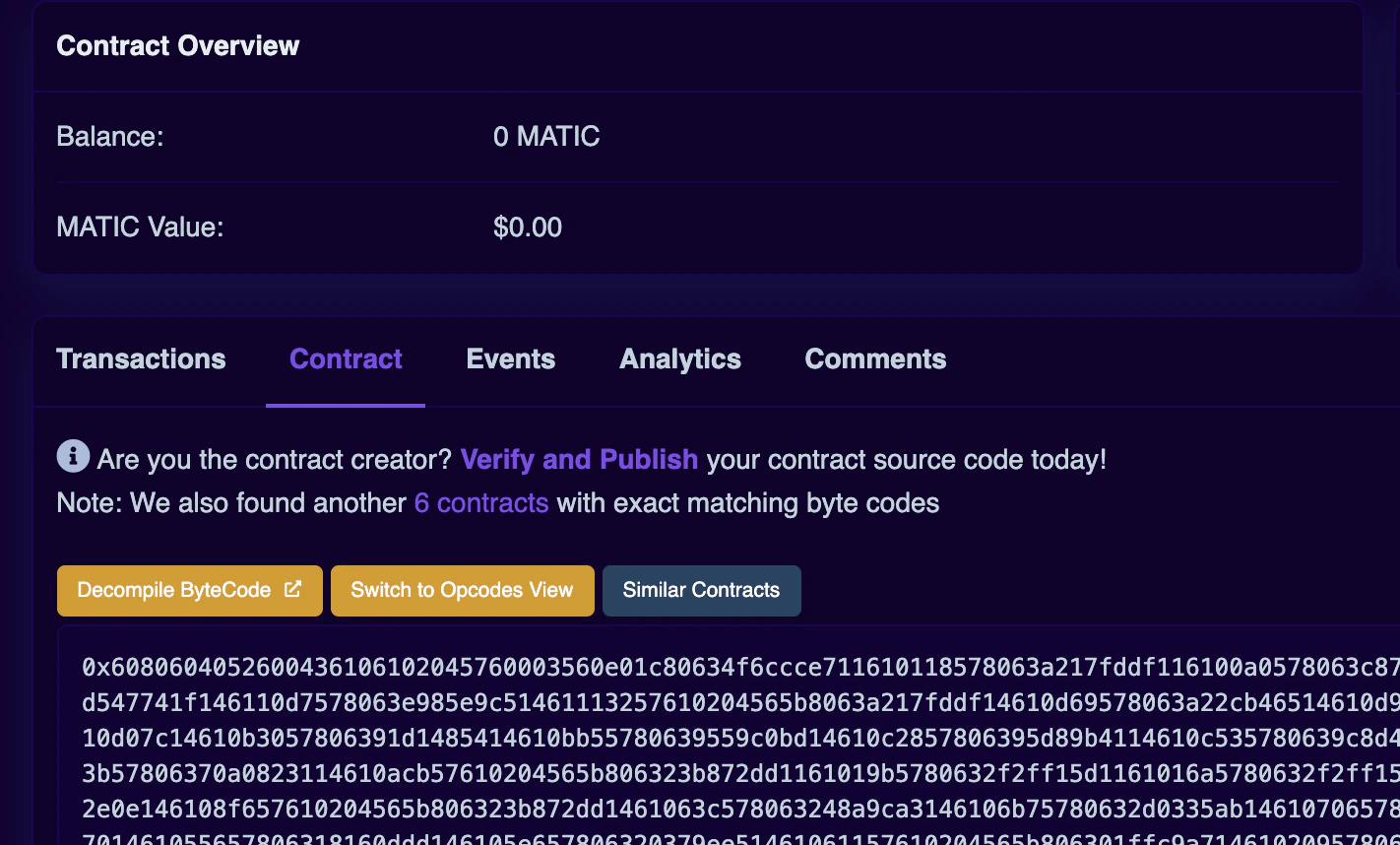 2. Select **Solidity (Single File)** as the compiler type.
3. Select the compiler version you used.
4. Choose your license type.
5. Paste your flattened contract source. Adjust the optimization settings to match what you used during compilation.
Constructor arguments are filled in automatically. If not, retrieve them from the trailing bytes of the deployment transaction (for example: `000000000000000000000000a6fa4fb5f76172d178d61b04b0ecd319c5d1c0aa`).
2. Select **Solidity (Single File)** as the compiler type.
3. Select the compiler version you used.
4. Choose your license type.
5. Paste your flattened contract source. Adjust the optimization settings to match what you used during compilation.
Constructor arguments are filled in automatically. If not, retrieve them from the trailing bytes of the deployment transaction (for example: `000000000000000000000000a6fa4fb5f76172d178d61b04b0ecd319c5d1c0aa`).